AI Assist
AI Assist is RezolveIT’s AI layer. It isn’t one screen — it’s a set of AI-powered capabilities woven through the platform, all governed from one admin console.
Where you meet it
Section titled “Where you meet it”- The Virtual Assistant — a chat panel employees open from the Employee Center to ask questions, walk through guided topics, or create a request just by describing what they need. See The Virtual Assistant.
- Skills on records — when an agent or admin is working a record (an incident, a case, a change), AI Assist can summarize it, draft work notes, draft resolution notes, or answer questions about it, right from a quick-action bar. See AI skills.
- AI-powered search and lists — type what you’re looking for in plain language (“critical incidents assigned to me”) and AI Assist turns it into a structured filter; a few other surfaces (App Designer, document-to-form extraction) use the same AI layer to turn a description or a scanned document into structured data.
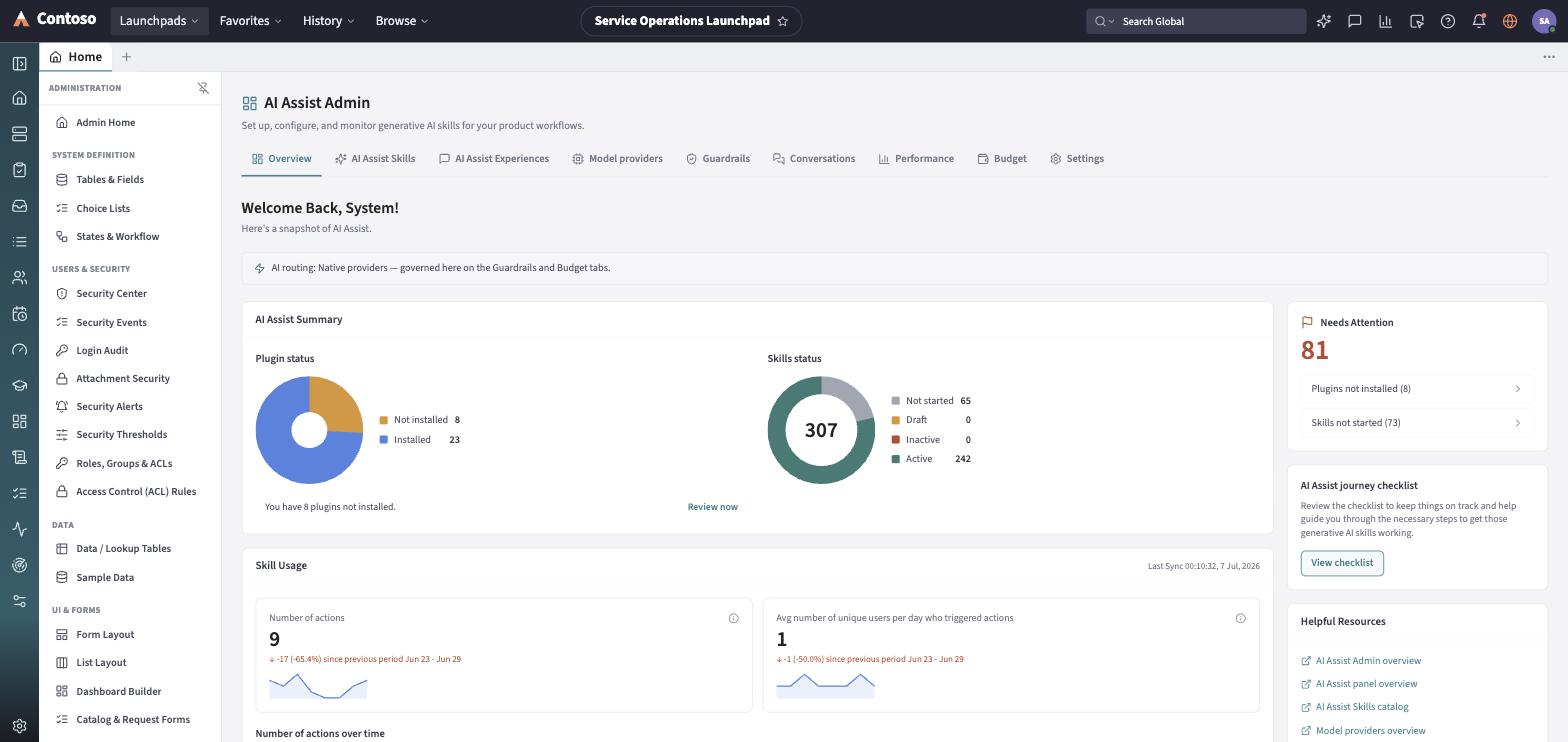
- The AI Control Center — the admin console where all of this is configured: which skills are active, which model provider answers requests, what the guardrails allow, what it’s allowed to spend, and how usage is trending. See The AI Control Center.
The short version
Section titled “The short version”An end user mostly notices AI Assist as the sparkle icon and the record quick-actions — answers, summaries, and requests created on request, always with a chance to review before anything is applied. An administrator sees a fuller picture: a catalog of skills to turn on per application, a choice of model providers (including an encrypted place to store their API keys, or an option to route everything through the organization’s own AI gateway), guardrails that block or flag risky input and output, budgets that cap spend, and usage analytics that show what’s actually being used.
In this section
Section titled “In this section”- The Virtual Assistant — the employee-facing chat assistant: what it can do, how requests get created, and how it stays on topic.
- AI skills — the real skill catalog by application (IT Service Management, Customer Service, HR Service Management, and more), what each skill does, and how admins turn them on.
- The AI Control Center — a tour of the admin console: Overview, Skills, Experiences, Model providers, Guardrails, Conversations, Performance, Budget, and Settings.
- Governance: guardrails, budgets and the external gateway — how AI Assist keeps itself in check, and what changes when an organization routes AI through its own gateway.