Security Operations
Security Operations (SecOps) is where security analysts triage security incidents and manage vulnerability exposure across the configuration item (CI) estate. This guide covers both; the mechanics of lists and records are shared across the whole app and covered in Working with lists and Working with records.
What it covers
Section titled “What it covers”| Area | What you do there |
|---|---|
| Security Incidents | Triage and work security incidents through their NIST-aligned SOC lifecycle — see Security Incidents. |
| Vulnerabilities | Track third-party vulnerability definitions (CVEs) — see Security Incidents. |
| Vulnerable Items | Track a vulnerability found on a specific configuration item through remediation — see Security Incidents. |
The home dashboard
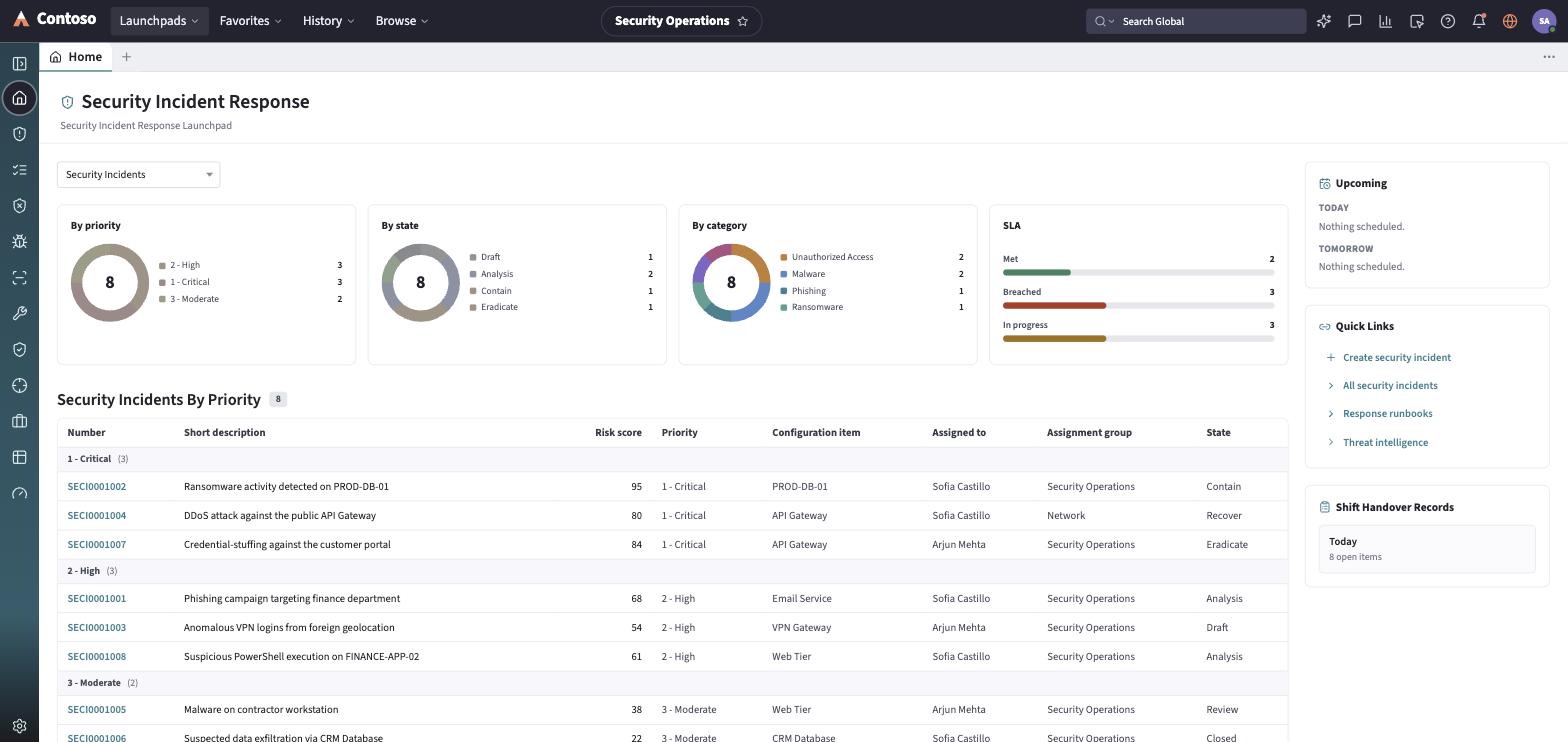
Section titled “The home dashboard”Landing on Home, a scope toggle (My Work / Security Incidents) filters everything below to your own queue or the whole team’s. Four chart cards summarize the open incident population: By priority, By state, and By category donuts, plus an SLA bar split into Met / Breached / In progress. Below that, a by-priority incident list groups records highest-priority first, showing Number, Short description, Risk score, Priority, Configuration item, Assigned to, Assignment group, and State — click any row to open the record. A right rail carries Upcoming (today/tomorrow), Quick Links (New incident, All incidents, Runbooks, Threat intel), and Shift Handover.
The navigation rail
Section titled “The navigation rail”- Home — the dashboard described above.
- Security Incidents — the main SIR queue.
- Response Tasks — a derived task board: for every active security incident, the tasks appropriate to its current phase, grouped Active / Pending / Done.
- Vulnerability Response — an overview dashboard rolling up risk distribution, SLA posture, top CVEs, and remediation progress across open vulnerable items.
- Vulnerable Items — the vulnerability-per-CI remediation queue.
- Vulnerabilities — the CVE / vulnerability-entry list.
- Remediation Tasks — the vulnerability remediation worklist.
- Configuration Compliance — a posture board over configuration compliance.
- Threat Intelligence — an indicator-of-compromise (IoC) list and lookup.
- Security Cases — a workbench for broader security investigations (insider risk, breach response, threat hunts) that can link back to one or more security incidents.
- Reports and Dashboard — saved reports and a dashboard-builder view over the security data.
Every list and record you open in this launchpad follows the same toolbar and layout conventions used everywhere else in the app — that shared behavior is documented once in the launchpads/shared guides rather than repeated per module.