Configuration Management DB
The Configuration Management DB (CMDB) is the system of record for an organization’s infrastructure: servers, applications, databases, network gear, and cloud resources, wired together with relationships and rolled up under the business services that other launchpads reference to connect an incident, change, or alert back to the piece of infrastructure it affects. This guide covers configuration items and their relationships in detail; the mechanics of lists and records are shared across the whole app and covered in Working with lists and Working with records.
What it covers
Section titled “What it covers”| Area | What you do there |
|---|---|
| Configuration items | Servers, applications, databases, network gear, and cloud resources — see Configuration Items. |
| Relationships | The dependency graph between CIs (Runs on / Depends on / Hosted on / Connected to) — see Configuration Items. |
| Business services | The services CIs roll up to, referenced by other launchpads — see Configuration Items. |
| Data governance | De-duplication, completeness, and compliance health scoring over the CI estate. |
The home dashboard
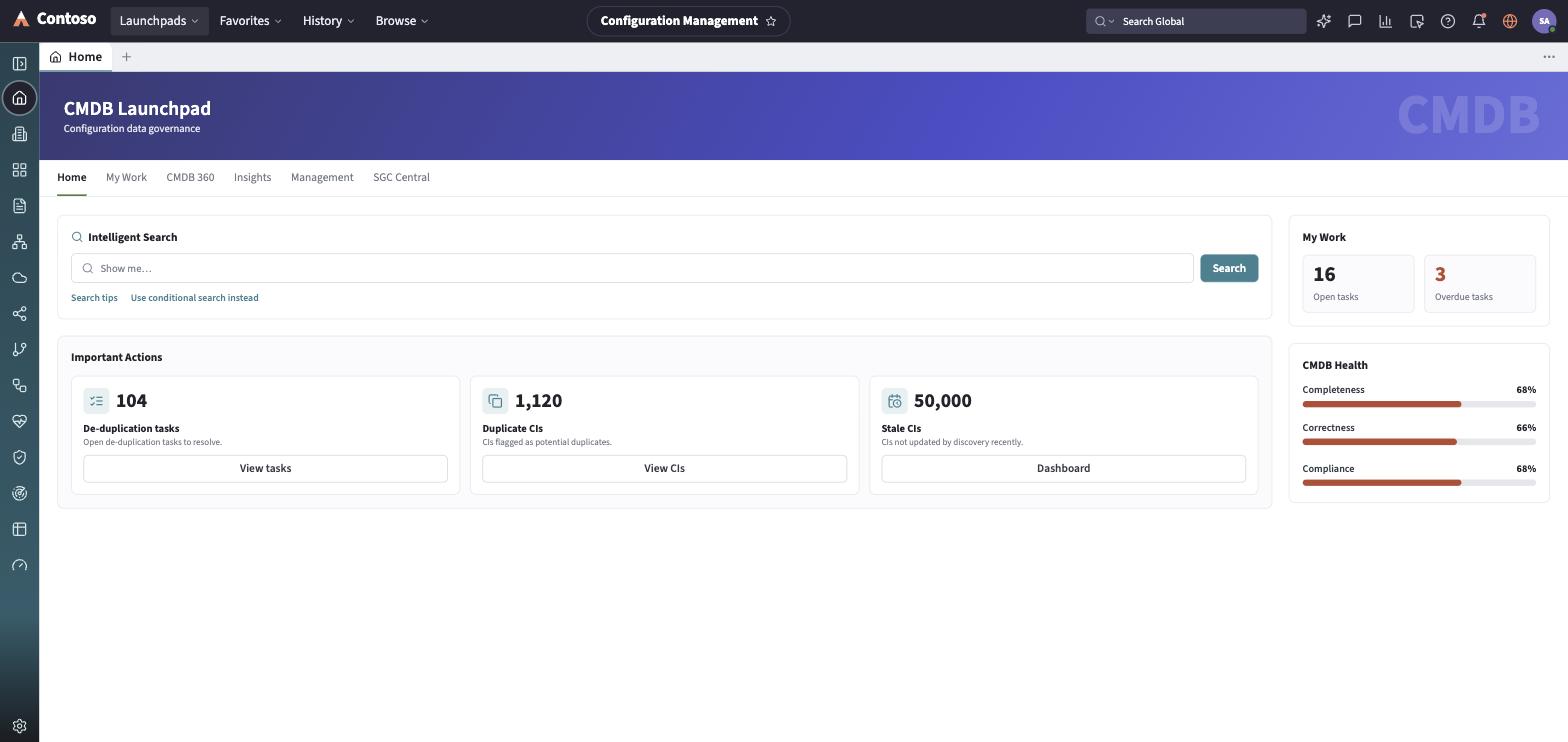
Section titled “The home dashboard”Landing on Home, the launchpad opens on a data-governance hub with six tabs — Home, My Work, CMDB 360, Insights, Management, and SGC Central. The Home tab leads with an intelligent search box, an Important Actions row of cards (de-duplication tasks, duplicate CIs, stale CIs — each a count linking into the CI list), and a right rail with My Work (open and overdue incidents/changes touching a CI) and CMDB Health (Completeness / Correctness / Compliance percentages). The other tabs deep-link into the CI list and work queues.
The navigation rail
Section titled “The navigation rail”- Home — the dashboard described above.
- Servers, Applications, Databases, Network Gear, Cloud Resources — per-class CI lists.
- Business Services — the services CIs roll up to.
- Relationships — an explorer over the CI dependency graph.
- Service Maps — for each business service, the downstream tree of CIs that deliver it, with a rolled-up health status.
- CMDB Health — completeness/correctness/compliance dashboards, broken out by CI class.
- Data Certification — the data-quality work queue behind the Home dashboard’s Important Actions.
- Discovery sources — where CMDB data comes from.
- Reports and Dashboard — saved reports and a dashboard-builder view over the CI data.
Every list and record you open in this launchpad follows the same toolbar and layout conventions used everywhere else in the app — that shared behavior is documented once in the launchpads/shared guides rather than repeated per module.