IT Asset Management
IT Asset Management (ITAM) tracks the hardware and software an organization owns end to end: hardware assets and the stockrooms that hold them, software licenses and the installs that consume them, consumable inventory, and the transfer orders that move stock between locations. This guide covers all of it; the mechanics of lists and records are shared across the whole app and covered in Working with lists and Working with records.
What it covers
Section titled “What it covers”| Area | What you do there |
|---|---|
| Hardware assets | Track a physical asset from purchase through disposal — see Assets. |
| Software licenses | Track entitlements, allocation, and expiration per publisher — see Assets. |
| Consumables | Track non-serialized stock (cables, peripherals, toner) by quantity on hand. |
| Stockrooms & transfers | Track inventory locations and the transfer orders that move assets between them — see Assets. |
The home dashboard
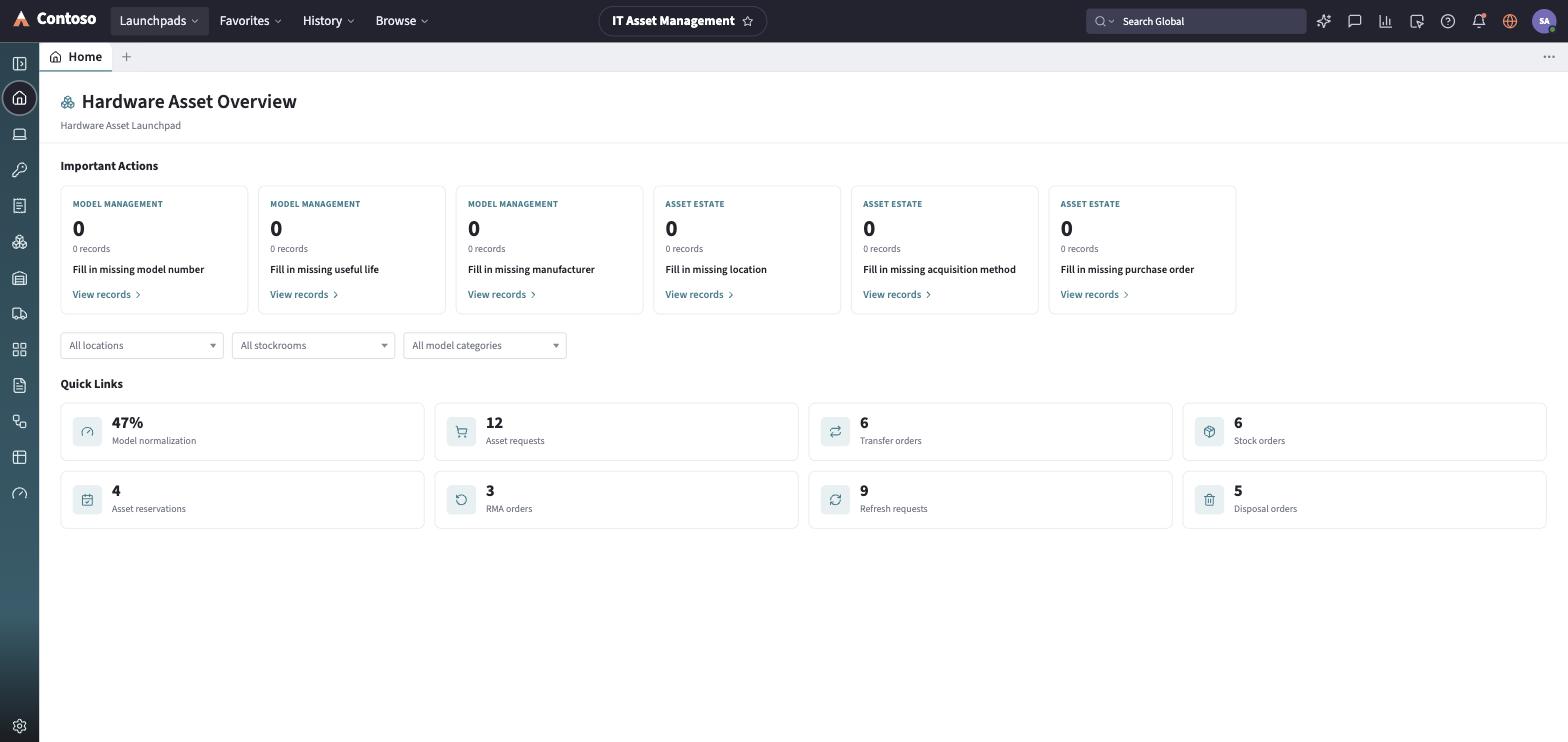
Section titled “The home dashboard”Landing in the launchpad, Home opens on the hardware asset overview. An Important Actions row of cards surfaces data-quality gaps on the hardware estate — assets missing a model number, useful life, manufacturer, location, acquisition method, or PO number — grouped under Model Management and Asset estate, each card showing a count with a link into the filtered asset list. Below that, a filter row (All locations / All stockrooms / All model categories) scopes the view to the real values found in the hardware data. A Quick Links tile grid gives one-click access to related work, including Transfer Orders with a live count of open transfers.
The navigation rail
Section titled “The navigation rail”- Home — the dashboard described above.
- Hardware Assets — the physical-asset list (laptops, servers, network gear, phones, displays, printers).
- Software (SAM) — the Software Asset Management overview: license positions, compliance, and install reconciliation across the license estate.
- Software Licenses — the license/entitlement list.
- Consumables — non-serialized inventory tracked by quantity on hand.
- Stockrooms — inventory locations.
- Transfer Orders — asset moves between stockrooms.
- Asset Models — the product models hardware assets and licenses reference.
- Contracts / Leases — supplier contracts and leases tied to assets and licenses.
- Lifecycle — a kanban-style board of every hardware asset, grouped by lifecycle stage.
- Reports and Dashboard — saved reports and a dashboard-builder view over the asset data.
The List destination also opens a picker over every ITAM record type, including a couple of entries (Asset requests, Stock orders) that are placeholders reserved for a future release rather than working lists today.
Every list and record you open in this launchpad follows the same toolbar and layout conventions used everywhere else in the app — that shared behavior is documented once in the launchpads/shared guides rather than repeated per module.